
One platform. Every record where it belongs.
OmniSync HR moves employee data between your global HRIS and your local payroll systems — on schedule, validated before it writes, with every outcome visible in your dashboard. This page is what's under the hood: what moves and in which direction, how the platform connects, what happens to a single record between systems, what we do with one that isn't ready for payroll, and what your month looks like once the sync is running.
What syncs — and which way
Four data domains. Direction matters: your HRIS is the system of record for people; your local systems are the source of truth for time and payroll results. The sync respects that.
| Domain | What moves | Direction | Why it matters |
|---|---|---|---|
| Employee master data | New hires, terminations, personal details, job & position changes, bank details | → HRIS → local payroll | The records that decide who gets paid — and that someone who left doesn't. |
| Org structure & cost centers | Departments, supervisory orgs, locations, cost centers | → HRIS → local payroll | Payroll costs land in the right buckets the first time — no month-end reallocations. |
| Time, attendance & leave | Timesheets, overtime, leave balances and requests | → Local systems → HRIS | Your system of record reflects what actually happened on the ground. |
| Compensation & payroll results | Salary changes and allowances down; payroll register results back | ⇄ Both directions | Comp changes reach payroll before cutoff; results flow back for global reporting. |
Which fields, exactly? That's the field-mapping step in week 2. Every field in scope is named in your mapping document before we build — versioned, signed off, and yours to keep. Only the fields in that document move — integration access is scoped to just the objects and fields your mappings need.
Add-on — Compliance Pack. PH statutory outputs — BIR, SSS, PhilHealth, Pag-IBIG — generated from your synced data. +$500/month on either tier.
See pricing →How it connects
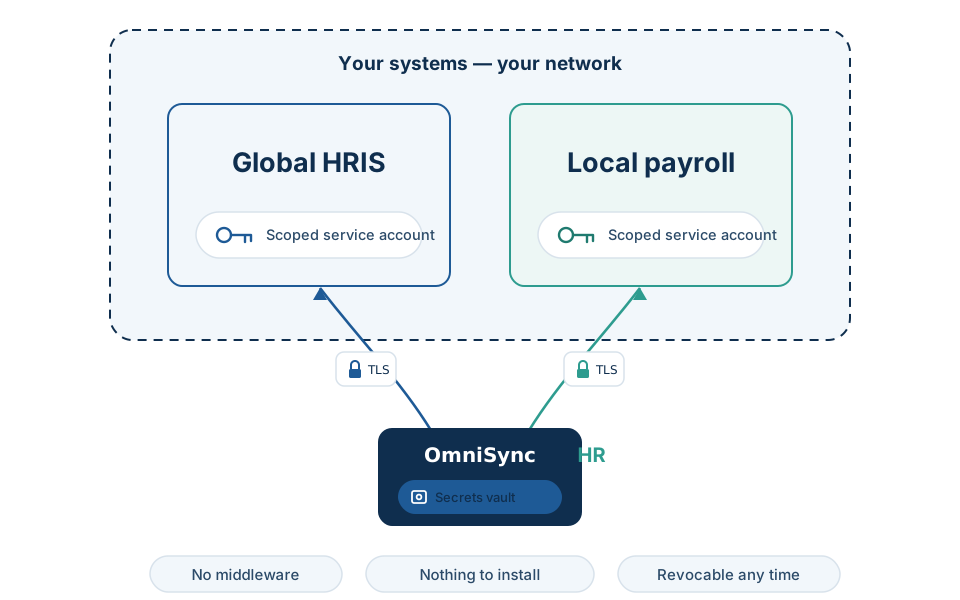
No middleware to license. Nothing to install, host, or patch on your side.
- A scoped service account you create and control. In Workday, that's an ISU — an integration system user with security groups limited to exactly the objects and fields your mappings use. Local systems connect the same way: an API credential scoped to the data in your mapping document, nothing more.
- Vendor-supported APIs first. We connect the way Workday, Sprout, and BambooHR intend integrations to connect. Running a local system with no usable API? We can usually still connect it — screen-based or direct-database connectivity is available as custom scope, priced in your quote.
- Credentials live in a secrets vault. Never in code, config files, or tickets. Every connection runs over TLS; everything the platform stores is encrypted at rest.
- Revocable by you, any time. The service account lives in your system, so you can suspend or revoke our access at any time — without asking us first.
What happens to one record
Take the record that matters most at cutoff: a termination.
Picked up on schedule.
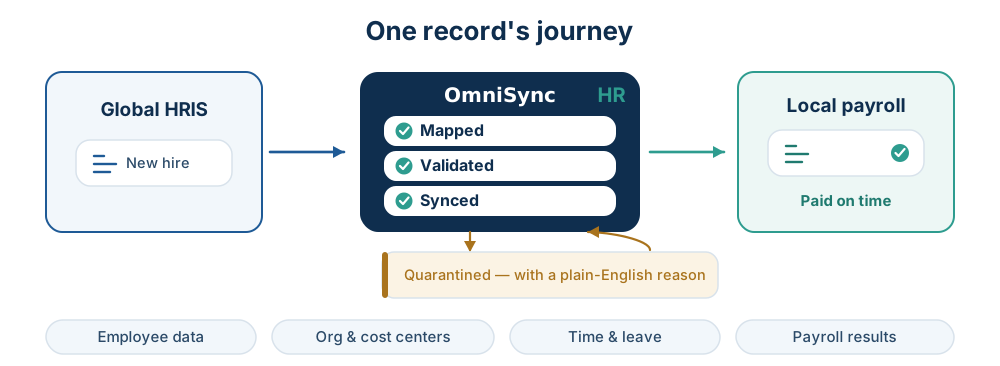
An employee is terminated in Workday on a Tuesday. On the next scheduled sync — hourly to daily, you set the cadence against your payroll calendar — the platform reads the in-scope records from the source system over its API. Nobody exports anything.
Mapped by rules you signed off.
Fields and code tables are translated using the mapping and transformation rules defined with you at onboarding — job codes, pay elements, date formats. Documented, versioned, and owned by you.
Validated before it touches payroll.
Every record is checked before anything is written: required fields present, formats valid, values within the rules we defined together. Not a generic sanity check — your rules, applied on every run.
Written — or quarantined.
A record that passes is written to your payroll system. A record that doesn't is held with a plain-English reason — never silently dropped, never blindly pushed.
Confirmed, visibly.
The run's outcome — records processed, written, quarantined — lands in your dashboard, your sync history, and your reconciliation report. The termination is in payroll before cutoff, and you can see that it is.
The rule underneath all of it: nothing writes to your payroll system without passing validation first.
One missed termination is an overpayment you chase for months. This pipeline exists so it can't slip through quietly.
When a record is wrong — shown, not claimed
Every integration demo shows clean data. Payroll data isn't clean: a hire whose bank account isn't in the system yet, a leave type payroll has never heard of, a date that doesn't parse. Most tools log that as
ERROR 422: PUT /workers/3291 unprocessable entity
Useful to an engineer. Useless at 4 p.m. before cutoff.
When OmniSync HR quarantines a record, the message names the record, the problem, the payroll consequence, and the fix:
No stack traces, no error codes, no "contact your administrator." And quarantine isn't a black hole:
- Caught before it lands. Validation stops the record before anything is written — payroll never sees a half-formed hire.
- One bad record never blocks the run. Quarantine is per record: the five hundred good records sync on schedule; the three bad ones wait, visibly, with reasons.
- Nothing waits in the dark. Every quarantined record appears in your dashboard with its plain-English reason — and in the run's email or Slack alert, so you hear about it the day it's held, not at cutoff.
- The fix happens at the source. Correct the record where it lives — usually your HRIS — then hit Re-run in the dashboard, or let the next scheduled sync pick it up. If the fault is in the mapping or the platform, it's ours, and we fix it.
- Every record is accounted for. The reconciliation report lists what synced and what's held — cutoff sign-off is a checklist, not a leap of faith.
A month with the sync running
Say you run semi-monthly payroll — cutoffs on the 10th and 25th, pay on the 15th and 30th. Here's where OmniSync HR sits in that month. (Everything adjusts to your actual calendar.)
Every working day
scheduled syncs run at the cadence you chose, hourly to daily. Hires, movements, and terminations approved in the HRIS land in payroll on the next scheduled sync — not in an export someone has to remember to run.
A couple of days before cutoff
download the reconciliation report from the dashboard: what moved this period, what's quarantined and why. Clear the exceptions while there's still time to fix them at the source.
Cutoff day
the sign-off you already do, except now it's a report review, not a row-by-row spreadsheet comparison at 9 p.m.
Payroll run
payroll processes on data both systems agree on. If a sync fails during your window, it's re-run the same business day — and Premium includes an emergency on-call line during your payroll windows.
After the run
payroll register results sync back to your HRIS, so global reporting reflects what was actually paid.
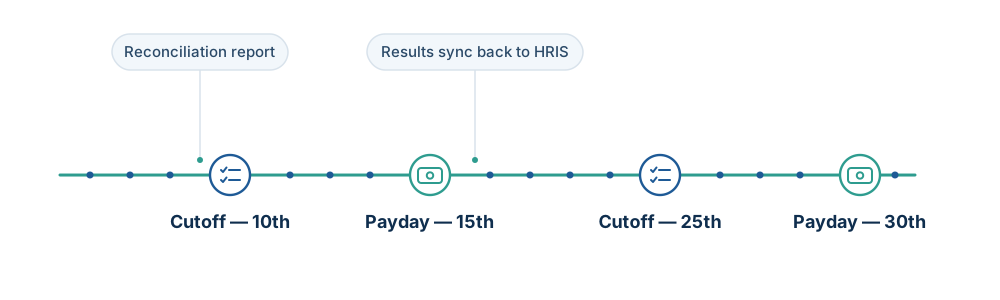
Cutoff comes twice a month, forever. The platform is built around that fact.
When something breaks — because eventually, something will
No integration vendor should promise you zero failures. APIs go down, credentials expire, upstream systems change without notice. What we promise is what happens next — and "monitored" means something specific here:
- Every run, watched to completion. Each scheduled sync is monitored for whether it ran, whether it finished, how many records it processed, and how many were quarantined.
- We know before you do. A failure alerts OmniSync HR engineers first — you find out from an email or Slack alert, never from a payslip.
- Re-run the same business day. Any failed sync is re-run before the day is out — it's in the SLA, with service credits behind it.
- Failures are shown, not smoothed over. The failure, the affected records, and the re-run all appear in your dashboard — every outcome, success or failure, no ticket required.
- Miss the number, and it costs us. 99.5% of scheduled syncs succeed, measured monthly, computed and displayed in your dashboard — the same number the service credits key off. Below it, credits apply: 10%, 25%, or 50% of the month's fee. You audit us with our own data.
- Cutoff is different. Premium includes an emergency on-call line during your payroll windows — because a failure on the 24th is not the same as a failure on the 2nd.
The dashboard: your answer to "is everything in?"
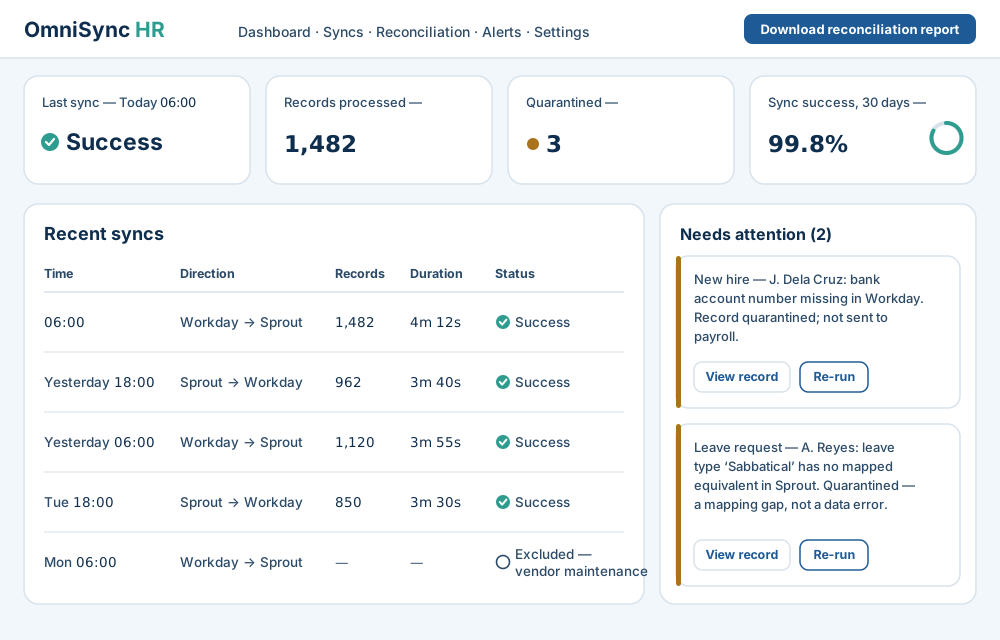
One screen, built around the questions you actually bring to it:
"Did last night's sync run?" Run status and history — time, direction, records processed, duration, outcome.
"What needs attention?" The quarantine queue: every held record with its plain-English reason, pointing at the source system to fix — so the correction happens once, in the system of record, not in a side spreadsheet. Nothing is silently dropped. Fixed at the source? Re-run the record from the same screen.
"Can I sign off?" Reconciliation reports download in one click, built for payroll cutoff sign-off. No ticket, no waiting on us.
"Are they hitting the SLA?" Your monthly sync-success rate, on the same screen, measured the way the contract measures it. You're never taking our word for it.
Email and Slack alerts cover failed runs and quarantined records — nobody has to keep the dashboard open to catch either.
Built for the org you'll have next year
Integrations rarely fail in month one. They rot in month nine — a reorg, a new pay element, a vendor API update — and the sync quietly drifts, because nobody owns the connector. Here, someone does.
- Vendor changes are our problem. Workday ships releases twice a year; local systems change APIs on their own schedule. When they do, updating and re-testing the connector is OmniSync HR's work — not a project, not your IT backlog's.
- Your changes go through the mapping document. New department, new allowance, an acquired entity — the change lands as a new version of your field-mapping document, tested and signed off before it touches production. No mapping change ships without your sign-off.
- The paper trail is yours. Every mapping version is retained and belongs to you. When an auditor asks what changed and when, the answer is a document, not an archaeology project.
- And it's in the monthly fee. Vendor-driven connector maintenance and minor mapping changes — a new department, a new allowance, a code-table addition — are included on every tier. Complex conditional or multi-entity logic is Premium's custom-logic feature; a new data domain or a new entity is scoped and quoted.
What OmniSync HR doesn't do
The honest limits, on the page instead of discovered in month two:
- It isn't real-time. Syncs are scheduled — hourly at the fastest, and that's deliberate. Payroll is a batch process with a cutoff, not a millisecond problem: a hire entered at 10:04 lands in the next hourly run, and because every record that moves is validated before it's written, a problem surfaces before cutoff, not during it. If you need sub-minute event streaming, we're the wrong tool and we'll tell you so on the scoping call.
- It doesn't become a third system of record. Your data lives in your HRIS and your payroll system; the platform moves it between them. There's no third system your team has to manage or reconcile against.
- It doesn't fix bad data — it catches it. A missing bank account number gets quarantined and explained, not invented. Clean sync starts with clean source data; the week-1 data audit exists for exactly this reason.
- It doesn't run your payroll. Your local system still calculates and pays. We make sure it calculates from the right records.
- It isn't a self-serve toolkit. No connector marketplace, no build-your-own canvas. Every integration is scoped, built, and run by our engineers — that's the point.
- Statutory files are an add-on. BIR, SSS, PhilHealth, and Pag-IBIG outputs come with the Compliance Pack (+$500/month), not the base tiers.
The boring security answers, up front
- Your systems stay the system of record. Employee data lives in your HRIS and your local systems — OmniSync HR moves it between them.
- Encrypted everywhere. TLS on every connection, encryption at rest for every stored record, credentials in a secrets vault — never in code or config.
- Least-privilege by scope. Integration service accounts can touch only the objects and fields your mappings need — nothing more.
- Runs in Singapore. Keeps 90 days. Hosted on AWS (ap-southeast-1, Singapore). Record-level operational data — payloads, quarantined records, run logs — is retained 90 days rolling, then deleted. Your systems stay the permanent home.
- Built for PH employee data. Philippine Data Privacy Act–compliant processing, with a GDPR-ready DPA for EU employees of multinational clients.
- SOC 2 Type II: in progress. Controls are being built to that standard now; the independent audit is on our roadmap. We'll say "certified" when we are — not before.
You get a platform. We operate it.
Every integration is designed, built, run, and maintained by OmniSync HR engineers — the same team, not a handoff chain. And managed doesn't mean opaque: you give up the operating, not the visibility.
We run the platform:
- Build and host the integration — no middleware on your side, no code you own, no new on-call rota
- Monitor every scheduled run; failures alert us first
- Re-run any failed sync the same business day
- Keep your field-mapping document versioned and documented
- 30 days of hypercare after go-live, with heightened monitoring
You keep the controls:
- The dashboard: every run, every record count, every exception
- Email and Slack alerts on any failure or quarantined record — you'll never discover a sync issue from a payslip
- Reconciliation reports to sign off before every payroll run
- The mapping document — yours, versioned, portable if you ever leave
- Our SLA performance, measured monthly, visible in your dashboard — with service credits if we miss
Support that matches your cutoff. Standard: Mon–Fri 9:00–18:00 PHT, next-business-day response. Premium: daily 7:00–22:00 PHT, 4-hour response, and an emergency on-call line during your payroll windows.
See it against your stack.
Which domains move, in which direction, on what schedule — mapped to your exact systems in one call, with a fixed quote within a week.
Book a scoping callPrefer to budget first? See full pricing →