
Workday, Sprout & BambooHR integrations — built and run for you
Global HRIS on one side. Your local systems on the other.
OmniSync HR builds and operates managed integrations between your global HRIS and the payroll and timekeeping systems your Philippine and APAC entities actually run — pairs like Workday ↔ Sprout and Workday ↔ BambooHR. Every integration is a pair: scoped, built, hosted, and monitored end to end, backed by a 99.5% sync-success SLA. Find your pair below. And if one side of yours isn't on this page, that's not a no — new connectors are built as part of your engagement: jump to "Not on the list?" or go straight to the scoping call.
Supported today 
An integration here is a pair — your global HRIS on one side, a local system on the other — scoped, built, monitored, and backed by the SLA as one unit, never a logo on a wall.
Workday ↔ Sprout — global HRIS to Philippine payroll and timekeeping. The pair the platform was built for.
Full entry ↓Workday ↔ BambooHR — two HR systems of record, kept in agreement — whichever direction your org runs them.
Full entry ↓Both pairs can be scoped today and go live in 4–6 weeks, after a parallel run against a real payroll cycle (→ see the full process). Every pair gets its own monitoring, its own SLA, and its own support (→ see pricing) — a second pair is never a side project.
Running these systems in a combination we haven't listed? Ask — that's a scoping-call question, not a no.
Why this list is short
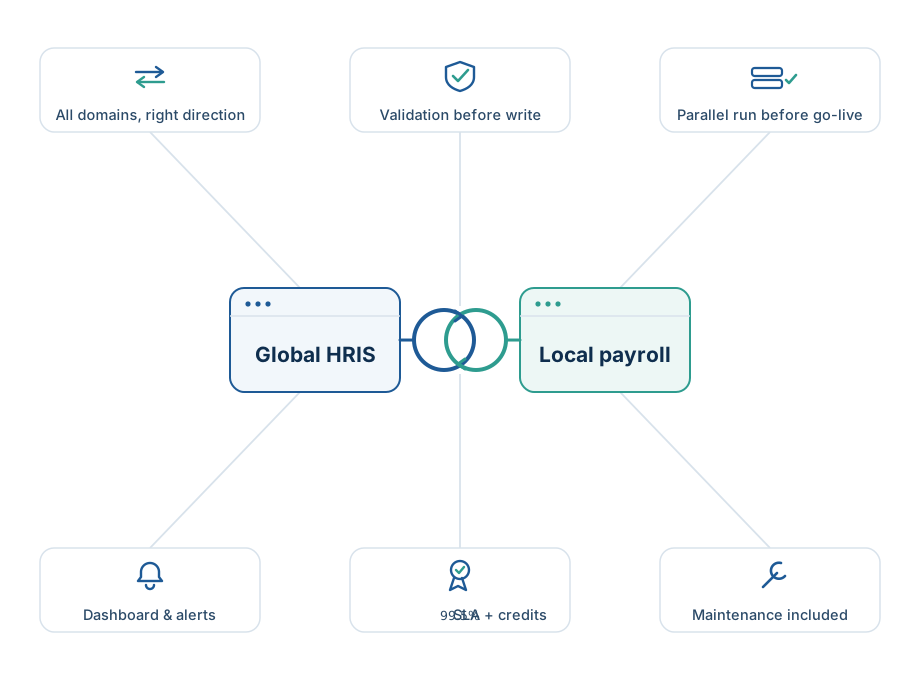
Connector catalogs grow the easy way: a logo goes up the day an API exists, and nobody tells you whether it means an integration someone will stand behind or a half-day proof of concept. This page grows the hard way. A system is listed as Supported only when we'll put the whole service behind it — not a connector license, the whole operation:
- Every data domain in your scope, each flowing the right way — employee and org data down to payroll, time and leave back up, comp down and payroll results back for a typical pair. What syncs, and which way →
- Validation before anything writes — records that aren't payroll-ready are quarantined with a plain-English reason, never silently dropped. How quarantine works →
- A parallel run before go-live — the sync runs against a real payroll cycle and you compare the outputs before cutover. How implementation works →
- The dashboard, alerts, and reconciliation reports — every run, every record, every exception, visible. Explore the platform →
- The 99.5% SLA with service credits — measured monthly, in the contract. Read the SLA →
- Connector maintenance in the monthly fee — Workday ships a release, a local vendor changes an API: updating and re-testing the connector is our work. Change management, on the Product page →
That's the bar a system clears before it enters the Supported row. We'd rather publish a short list that's true than a long one that's aspirational. At payroll cutoff, the only integration that matters is yours.
Workday ↔ Sprout integration 
If you searched for exactly this pair, you're in the right place.
Most integration vendors can talk Workday. The Philippine half is where they go vague. Semi-monthly payroll means the sync has to be right twice a month, not once. Thirteenth-month pay, leave conversions, and government ID numbers are ordinary fields here, not edge cases. And four agencies — BIR, SSS, PhilHealth, Pag-IBIG — each expect their own outputs on their own deadlines. That half is what we specialize in. It's why OmniSync HR exists.
What a Workday ↔ Sprout engagement covers:
- Hires, movements, and terminations approved in Workday land in Sprout on the next scheduled sync — validated first, quarantined with a plain-English reason if a record isn't ready. The termination that slips past cutoff is the record this platform exists to catch.
- Time, attendance, and leave from Sprout flow back, so Workday reflects what actually happened on the ground.
- Compensation changes flow down so they reach payroll before cutoff; after each run, the payroll register flows back to Workday, so global reporting shows what was actually paid.
- Exactly which fields map to which is fixed in your week-2 mapping document — versioned, signed off, yours. Only what's in that document moves. See what syncs, and which way →
How it connects: a Workday ISU you create, scoped to only the objects and fields your mapping document names, and a scoped Sprout API credential under the same rule — vendor-supported APIs on both ends, revocable by you any time. How it connects, on the Product page →
Cadence: you set it — hourly to daily — against your payroll calendar.
Running PH statutory filings? Add the Compliance Pack (+$500/month) and your BIR, SSS, PhilHealth, and Pag-IBIG outputs are generated from the same synced data your payroll ran on. Details below.
Going live: 4–6 weeks, after a parallel run against a real Sprout payroll cycle. Forward this to IT: the whole ask on your side is the scoped service account, one mapping workshop, and a UAT contact — hours, not weeks. How implementation works →
From $10,000 setup + $2,249/month as a Standard pair, 99.5% SLA included. Full pricing →
Book a scoping call — a fixed quote for Workday ↔ Sprout within a week.
Workday ↔ BambooHR integration 
The usual shape: Workday as the global system of record, with a regional or acquired entity still running BambooHR. Run them the other way? The sync follows your setup — which system is the source of truth for what is fixed in week-1 discovery, not assumed. Either way, two systems of record for the same people drift apart one re-keyed hire at a time — this pair keeps them in agreement without an export anyone has to remember to run.
What a Workday ↔ BambooHR engagement covers:
- Employee master data and org structure flow from your system of record, so both systems agree on who works where — and a leaver in Workday can't stay active in BambooHR.
- Time and leave recorded locally flow back up, so global reporting reflects ground truth.
- Comp changes flow down; where BambooHR feeds a payroll process, register results flow back to Workday for global reporting.
- Which domains are in scope for your setup is agreed in week-1 discovery and fixed in your mapping document — versioned, signed off, yours. Only what's in that document moves.
Same platform, same controls: scheduled syncs hourly to daily, validation before anything writes in either direction, per-record quarantine with plain-English reasons, and a dashboard that proves every run happened. See how the platform works →
How it connects: a Workday ISU you create and a BambooHR API credential, both scoped to just the objects and fields your mappings use, both revocable by you any time. How it connects, on the Product page →
Going live: 4–6 weeks, after a parallel run against a real payroll cycle. Your IT team's total effort: hours, not weeks. How implementation works →
From $10,000 setup + $2,249/month as a Standard pair, 99.5% SLA included. Full pricing →
Book a scoping call — a fixed quote for Workday ↔ BambooHR within a week.
On the roadmap 
Status means something specific on this page:
| Status | Systems | What it means for you |
|---|---|---|
| Planned | SAP SuccessFactors · Darwinbox · GreatDay HR · PayrollHero · NetSuite · Xero (GL export) | On the roadmap, unscheduled on purpose. We publish no dates we can't keep; build order follows real demand. |
A roadmap row is not a waiting list. If your pair includes a system marked Planned, don't wait for the label to change — bring it to a scoping call: we'll tell you honestly what's already built, what isn't, and what your quote covers to close the gap. There's no upvote button here — a scoping call is the vote. How that answer gets decided ↓
The rule that governs this page: a name moves up when the work is real — never when it's merely announced. If a status here ever looks conservative, it is. That's the same standard we'll apply to your payroll data.
The Compliance Pack: an output, not a connector 
Getting both systems to agree is half the month. Then come the agencies — BIR, SSS, PhilHealth, Pag-IBIG — each with its own formats and its own deadlines.
The Compliance Pack generates your PH statutory outputs from the same synced data your payroll ran on — no separate data feed, no second source of truth, nothing re-assembled by hand in between. You still review and file; what you file is generated from the same records your payroll actually ran on. It doesn't need a row in the grid above; it needs your sync running.
+$500/month, on either tier, built during your engagement. See pricing →
Not on the list? That's a scoping call, not a dead end.
Nobody lands on this page by accident. If you searched for your exact pair and it isn't here, that doesn't disqualify you — it's the reason to talk. New connectors are built as part of client engagements — that isn't a workaround; it's the standard route. Here's how the answer gets decided:
- Your system has a vendor-supported API. The standard route. The connector is built as part of your engagement and runs under the same validation, dashboard, and SLA as every supported pair.
- No usable API. Screen-based or direct-database connectivity is available as custom scope — priced in your quote, with a connection-specific SLA scoped to how it connects. We'll tell you which route your system needs before you see a quote.
- We're the wrong tool. Then we'll tell you that on the call, and you'll have lost nothing but the call.
One honest note: a first-of-its-kind connector is scoped as exactly that. Published prices are starting prices for typical two-system integrations — if your system needs more, the quote says so up front, not in a change order later.
Common questions about our integrations 
Does Workday integrate with Sprout?
With OmniSync HR, yes — a managed Workday ↔ Sprout sync covering employee data, org structure, time and leave, and payroll results. We build and run it; you get the dashboard and the 99.5% SLA. See what syncs for this pair.
Does Workday integrate with BambooHR?
Yes — Workday ↔ BambooHR is a supported pair, delivered the same way: scoped, built, and run by OmniSync HR, backed by the SLA. Details above.
How do you connect to Workday?
Through a scoped integration system user (ISU) you create and control — limited to exactly the objects and fields in your mapping document, revocable any time. How it connects, on the Product page →
Can you integrate a payroll system that has no API?
Usually, yes. Systems without a usable API can be connected via screen-based or direct-database access — sold as custom scope, with pricing and a connection-specific SLA defined in your quote.
What does an integration cost?
Published, per integration pair: Standard from $10,000 setup + $2,249/month; Premium from $15,000 + $3,749/month. Pay the year up front and save 20%. Full pricing →
My systems aren't listed. Can you still help?
In most cases, yes — new connectors are built as part of your engagement. Bring your stack to a scoping call.
Found your pair? Didn't?
The next step is the same either way: a scoping call that pins down what this page can't know — which of the four domains are in scope for your stack, the sync cadence against your payroll calendar, your entities and code tables — and gets you a fixed quote within a week, whether or not you buy.
Still reading first? → What actually moves between systems (Product) · → What a pair costs (Pricing) · → How implementation works (How It Works)